Pricing & Add-ons
ShowCato is free to use with 1 GB of storage and no credit card. You pay only for extra storage or the add-ons you choose.
Most sellers can run their whole catalog-to-quotation process without paying anything. You add products, share links, receive enquiries and see buyer analytics for free. Paid add-ons are there for when your business needs more, such as GST invoicing or your own domain.
There is no plan to upgrade and no contract to sign. You switch on only the add-ons you want, one at a time, for one month at a time.
Free Forever plan
Everything below is included at ₹0:
- Products, categories, subcategories, collections, variants and formula pricing
- Bulk upload from Excel or CSV
- Catalog links for specific buyers, with expiry, deactivation, discounts and price controls
- Interactive and Showcase catalogs, and buyer verification
- Quotations by WhatsApp, email, PDF and copy text
- Enquiries with PDF download and CSV export, and buyer analytics
- Buyers, team members, GST and multiple businesses
- Lead Connect, once it is enabled for your account
- Packages for service businesses
- Support tickets and 1 GB storage
Is the free plan enough for me?
For many small and mid-size sellers, yes. If your daily work is sending catalogs to buyers and replying to their quotations, the free plan covers it. You can keep using it for as long as you like.
You will usually look at add-ons when you want to bill buyers from inside ShowCato, use extra automation, or your photos fill up the free storage.
A few hundred products, links sent on WhatsApp, bills made in another tool.
- The free plan is usually enough
- Watch your storage as you add photos
Wants each enquiry to become a GST invoice and to track who has paid.
- Free plan plus the Invoice Billing add-on
- See Invoices
Thousands of high-quality photos across several ranges.
- Free plan plus extra storage
- Add-ons as the team needs them
Paid add-ons
Add-ons are extra features you switch on for your account. Each one has its own monthly price. The list below is live, so it always shows the add-ons and prices offered today.
| Add-on | What it adds | Price |
|---|---|---|
| Invoice Billing | Create invoices, track payments, upload invoices, and download PDFs. | ₹99 / month |
| WhatsApp Message Sending | Send catalog and enquiry updates through WhatsApp messaging. | ₹39 / month |
| Add Your Own Domain | Connect your own business domain with your Showcato catalog experience. | ₹119 / month |
| AI Product Listing Extraction | Use AI to extract product listing data from your old catalog or existing data. | ₹109 / month |
| Staff Role Manager | Create team roles and assign staff permissions. | ₹29 / month |
Prices can change. The price shown on the add-on card in Advance Features is the one used in your activation request.
Add-ons belong to the account owner
An add-on is switched on for the owner's account. Team members work under the owner, so they use the same account's add-ons where their access allows. Some screens, such as Invoices, stay owner-only even when the add-on is active.
Activating an add-on
Add-ons are switched on by the ShowCato team, not by an online checkout. You send a request from inside ShowCato and the team contacts you to arrange payment.
- Open Advance Features and click Activate on the add-on.
- A support request opens, already filled in with the add-on and price. Click Submit Request.
- The card shows Processing while the ShowCato team contacts you for payment and switches it on.
- The card shows Active until a date. Each activation lasts 1 month.
A screen that needs an add-on you do not have takes you to the same activation request.
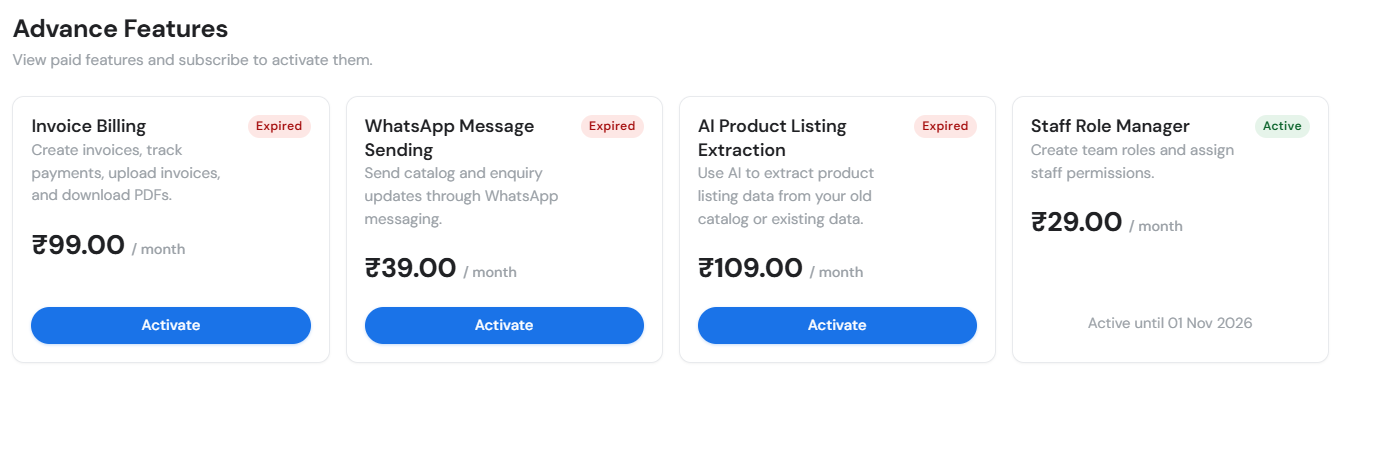
What each card status means
| Status | Meaning | Button |
|---|---|---|
| Inactive | You have not used this add-on yet | Activate |
| Processing | Your request is with the ShowCato team | View Request Status |
| Active | The add-on is on, until the date shown | Shows Active until the end date |
| Expired | The month has ended and the add-on is off | Activate to request it again |
Renewing for another month
Activations do not renew on their own. When the end date passes, the card shows Expired and the add-on stops working. To keep using it, click Activate again and send a new request.
Note the Active until date in your calendar. Send your renewal request a few days before, so there is no gap.
Tracking your request
Your request is a normal support ticket. Click View Request Status on the card, or open Support, to see replies from the team. If you click Activate again while a request is open, ShowCato takes you to that same request instead of making a new one.
Extra storage
₹100 per GB per year, in packs of 1, 5, 10 or 25 GB. See Storage.
Storage holds your product photos and files. Check how much you have used on the Storage page. ShowCato warns you as you get close to full, and new product uploads are blocked once storage reaches 100%.
Buying storage works like add-ons: choose a pack, send the request, and the ShowCato team adds the space after payment.
Before buying storage, delete old product photos you no longer sell. Smaller, well-cropped photos also use less space and load faster for buyers.
Enterprise
CRM integration, private hosting, white label and custom development are priced by consultation. See Enterprise.
Common questions
Do I need a credit card to start?
No. You can sign up and use the free plan without any card.
Can I pay for add-ons online inside ShowCato?
Not at the moment. You send an activation request, and the ShowCato team contacts you about payment before switching the add-on on.
What happens when an add-on expires?
The screens for that add-on stop opening until you activate it again. Your free features keep working as usual.
Can I try an add-on for a short time?
Each activation is for one month. That makes it easy to try an add-on for a month and decide whether to continue.
Billing questions and refunds are covered in the Refund & Cancellation Policy.